
Projects
You’ll add a repo as a project, send it work, and follow that work to merged pull requests. A project doesn’t need a repo to start: it can be a plain folder, and repos can be added later.
Add a project
Section titled “Add a project”-
Add a GitHub repo. fleetd clones it onto a worker:
fleetd project add https://github.com/acme/storefrontExpected output:
cloning into /home/me/src/storefront on devboxstartingreceivingresolvinginspecting✓ ~/src/storefront cloned and added on devboxLead needs: no CI found: the merge train holds its PRs until the repo has CIDefault branch: mainCI: none; required checks: noneMerge: unprotected, squash allowedWrite to its lead in the app's chat, or from any agent with chat_send; the lead starts with the first message. -
Read the
Lead needs:line. It names anything to fix on GitHub before the first pull request, such assquash merges are off on acme/storefront.
What you can pass
Section titled “What you can pass”| You pass | fleetd does |
|---|---|
A GitHub URL or owner/repo |
Clones it onto the least busy online worker, into ~/src (or ~/code, ~/projects). |
A path, such as ~/src/storefront |
Adds that existing checkout on this machine. |
A folder with no git, such as ~/notes |
Adds it as a plain folder: its lead chats, remembers and uses screens there. Agents that change code need a repo. A Navi is one of these. |
--new <name>, such as --new "Field notes" |
Starts a new, empty project: the machine makes its folder. See Start a new project. |
| Nothing, in a terminal | Lists checkouts on every worker and your repos from gh repo list, to pick from. |
| Option | Does |
|---|---|
--machine <id> |
Clone to, or look for the path on, that worker. |
--dest <dir> |
Clone into that folder, or make a new project’s folder there. |
--git-init |
With --new: run git init in the new folder. |
--use-existing |
Add the folder’s checkout when it already holds the same repo. Without a terminal, this is how you accept it. |
fleetd reads GitHub through gh on the hub machine, as the hub’s GitHub App where it is installed. A private repo clones on any worker where gh auth login was run.
When something is in the way, such as an offline worker or a folder that exists, it prints the command that fixes it.
Start a new project
Section titled “Start a new project”A project can start as a plain folder, with no repo. In the app, open Add project, type the new project’s name and pick New project. Pick the machine, check the folder it shows, and click Create project. From a terminal:
fleetd project add --new "Field notes" --machine devbox- The folder is
~/fleetd/projects/<name>on that machine unless you change it. - An empty folder that is already there is used as it is. A folder that holds files is refused, and nothing is added.
- It has no git unless you tick Start a git repo in it (
--git-init).
The project opens at once. Its lead chats, remembers and uses screens in the folder; agents that change code need a
repo. Add one when you need it in Settings → Projects → Repos, or with fleetd project repo add.
List and remove projects
Section titled “List and remove projects”fleetd project listfleetd project remove devbox/storefrontlist prints each project as <machineId>/<projectId>, its title and its folder. remove stops the project’s agents and forgets it. Its files, branches and worktrees stay.
To also remove the worktrees its agents worked in, delete it from the app instead: see Delete a project.
A project is a lead and its own folder, holding zero or more git repos. A project added from a checkout holds that checkout; add more to keep one lead across several repos.
fleetd project repo add devbox/storefront ~/src/apifleetd project repo add devbox/storefront https://github.com/acme/web --name webfleetd project repo list devbox/storefrontfleetd project repo remove devbox/storefront api- Add takes a checkout on the project’s machine, or a GitHub repo to clone there (with
--destand--use-existing, as forproject add). The name comes from the remote or folder unless you pass--name. - The checkout stops showing as a project while a project holds it. A checkout that was a project of its own is archived: its chat and history stay, and its lead no longer runs. fleetd refuses while its agents run.
- One repo can be in several projects.
- The project’s environment variables, MCP servers and skills go to every one of its checkouts.
- The lead’s first message lists the project’s repos, and each agent works in the one the lead names: see Agents in a project’s repos.
- Remove cancels that repo’s running agents. The project’s other work goes on. Nothing is deleted: the checkout stays on its machine and, once no project holds it, shows as a project of its own again. A project’s own folder can’t be removed this way; remove the project instead.
The same actions are in Settings → Projects → Repos, and agents have project_repo_add, project_repo_list and
project_repo_remove.
Project settings
Section titled “Project settings”Open a project’s settings in the desktop app: Settings → Projects, then pick the project. Machines → a project’s … menu → Settings… opens the same page.
| Setting | Does |
|---|---|
| Name | How fleetd shows the project. Its folder keeps its own name. |
| Repos | The git repos the project holds, each with its remote, base branch and checkout (machine and path), and the setup and preview it runs with: its own, or the default. A plain folder holds none. Add repo and Remove…: see Repos. Under them, Default setup: what runs in each new worktree of a repo without setup of its own. See Setup commands. |
| Keep finished worktrees | Off (the default): a reader’s worktree goes when its task finishes, and a writer’s once its pull request merges; any left behind go in the nightly cleanup. On: they stay on the machine. |
| Environment variables | Variables every new agent of the project gets. See Environment variables. |
| MCP servers | The project’s own MCP servers for its agents, and the global ones it gets. See MCP servers. |
| Merge train | The checks the train also waits for before a merge, and those left for after it. See Which checks it waits for. |
| Delete project | See Delete a project. |
Its Instructions & memory page has Refresh memory every night: on (the default), around 04:00 on a day with chat or orders, the lead tidies the project’s memory and the chat shows one line of its changes, with Undo; off, memory changes only as the lead and you write it. See The nightly refresh.
The page also shows where the project’s worktrees live on its machine (~/.fleetd/node/worktrees/<project>/, one per
agent), the branch new ones start from (the repo’s default branch, freshly fetched; see Which branch),
and how many are there now. That part needs the machine online.
Environment variables
Section titled “Environment variables”Add one at a time with Add variable, or paste a .env file with Paste .env. A pasted file may use export,
quotes and # comments, and a quoted value may run over several lines, as a certificate chain or a service account’s
JSON does. A name that looks like a credential (STRIPE_KEY, GH_TOKEN, DB_PASSWORD) starts as a secret, and each
one can be switched.
| Kind | Where its value lives | Shown |
|---|---|---|
| Plain | The hub and the project’s machine. | In the list. |
| Secret | Only the project’s machine. | Never again: only its fingerprint (the first 8 hex characters of its SHA-256) and its size. |
A secret is sealed in the app to its machine’s key, as a secret request is. The
hub passes the sealed value on without storing or logging it. The node keeps the project’s variables in a file of its
own in ~/.fleetd/node/project-env/, mode 0600, and adds them to every claude it starts for the project from then on.
An agent already running gets a change at its next start. To change a secret, type a new value: the old one is never
shown.
If an agent prints a secret (printenv, a stack trace, a config dump), the node replaces it with ***NAME*** before
the output leaves the machine, in command output, the agent’s replies and live text alike. Exactly these are masked:
- the whole value, and its base64 and URL encodings, and its encoding as a web form submits it (
+for a space); - for a secret of several lines, each whole line of 8 characters or more, wherever it appears. PEM armor lines such as
-----BEGIN CERTIFICATE-----are the same in every file and stay readable.
Only exact matches are caught. Part of a line (head -c 20 of a key, one field cut from a line), the value in another
encoding, or a value under 4 characters goes out as printed, so keep secrets out of output where you can. A line of a
secret is masked even where the same text comes from somewhere else, such as a generic line of a JSON file.
The hub and the app never get a secret’s value: they see its name, its fingerprint and its size in bytes (the size counts toward the project’s total).
Names are letters, digits and _. fleetd sets HOME, PATH, USER, TMPDIR (and TMP, TEMP, CLAUDE_CODE_TMPDIR) and every
FLEETD_ variable itself, and a project can’t change how claude itself runs: ANTHROPIC_* and CLAUDE* names are
refused. A variable the node already gives every session, from its own environment or
claude.env, keeps the node’s value.
| Limit | Is |
|---|---|
| Variables in a project | 100 |
| One value, plain or secret | 64 KiB, any number of lines, no NUL character |
| All of a project’s values together | 512 KiB: every one goes into every agent’s environment, and the system refuses to start a process whose environment is too large |
An agent that needs a variable no one set asks its lead for it by name; the value you enter then reaches only that order’s agents, until the order closes: see A variable an agent asks for. Each agent’s brief lists the variables it gets by name.
From an MCP client: project_settings_get reads a project’s settings, project_settings_set renames it or sets
keepWorktrees and setup, and project_env_set sets and removes variables, a secret sealed to the machine’s
boxPubKey. project_env_set takes only a human key. Give either settings call a repo (a repo’s name, such as
api) to read or set that repo’s own setup and preview; a repo with none of its own uses the project’s.
Setup commands
Section titled “Setup commands”The project’s Default setup, under its repos: commands that run in each new worktree of a repo without setup of
its own, before its agent starts: install dependencies, generate code. One a line, in
order; each runs with sh -c in the worktree, with the project’s variables (and the order’s), the machine’s build
jobs and the agent’s own $TMPDIR. The first that fails, or runs past the time limit (10 minutes unless you set
another, up to an hour), stops the rest.
- Each command shows on the agent’s thread in the app as it runs, with its exit code and the end of its output, and the agent’s brief says what ran.
- A failure fails the agent’s start: its task fails with the command and the end of its output, and its lead hears it. With Start the agent anyway when setup fails on, the agent starts and hears what failed instead.
- Skip when unchanged: name the files whose contents decide what setup makes, such as
pnpm-lock.yaml. A worktree set up before (a task restarted on its own worktree) is not set up again while the commands and those files are unchanged. With none named, setup runs every time. - A worktree that is gone when its agent goes on (removed, or deleted) comes back and is set up again first. Setup counts as done only once it has run to its end: if the machine’s fleetd stops in the middle, it runs again at the agent’s next start. Stopping or interrupting the agent during setup ends it there, and the agent doesn’t start.
- Setup runs only in agents’ worktrees, never in the project’s checkout, and only on machines whose fleetd is new enough; the page says when it isn’t.
Delete a project
Section titled “Delete a project”Delete project… stops the project’s agents, removes the worktrees they worked in, and forgets the project and its settings. Type the project’s name to confirm. If any of its worktrees has uncommitted changes, the dialog names them: those changes are lost. The app lists the worktrees again when you click it, so Delete waits while the project’s machine is offline or can’t list them.
What stays: the checkout itself, untouched, every branch (so every commit stays reachable), your own worktrees of the repo, and its pull requests on GitHub. Add the folder again any time; the toast after a delete has Add it again.
Nightly worktree cleanup
Section titled “Nightly worktree cleanup”Some worktrees outlive their agent: a cancelled writer’s, one whose pull request closed unmerged, a failed task’s, and any whose removal failed. Every night around 04:00, and once about 10 minutes after the hub starts, the hub removes those of agents that finished more than 3 days ago. No model runs for it.
- Only a worktree whose work is safe elsewhere goes: no uncommitted changes, and every commit on a remote branch or already in the base. Its branch stays unless it merged, so every commit stays reachable.
- A worktree holding work that exists only there is kept, and the project’s chat says so once, with its path. Push or delete that work, and the next night’s cleanup removes it.
- One its machine couldn’t remove (offline, a git error) is tried again the next night. After a week of failed tries the cleanup gives it up and says so once in the chat: delete it by hand if that machine is still in use.
- A project with Keep finished worktrees on is left alone.
The hour is 04:00 in the zone of the global decision policy.tz, else the hub machine’s. To keep worktrees longer or
shorter than 3 days, record a global decision policy.worktree_days with the number of days (decisions_record).
Which branch fleetd works on
Section titled “Which branch fleetd works on”| What | Is |
|---|---|
| The base each writer branches from | The checkout’s origin/HEAD, else its current branch. |
| A task’s branch | fleetd/T<n>-<slug>, such as fleetd/T1-fix-readme-typo. Change the fleetd/ prefix with branchPrefix in the policy file. |
| Where the merge train merges | Each pull request’s base branch. See Merge train. |
The Default branch: line that project add prints is GitHub’s default branch. fleetd uses it to watch main’s CI and
to read its protection rules. To work against another branch, point the checkout’s origin/HEAD at it on the worker:
git remote set-head origin releaseIts lead
Section titled “Its lead”Each project has one lead and one chat with it. Your first message starts the lead: there is nothing to start by hand. See Chat with the lead.
If the lead can’t start, your message waits and the chat says why. Common causes:
| Cause | Fix, on the worker |
|---|---|
claude is logged out |
claude auth login |
claude is outside the supported versions |
See claude versions |
| The worker is offline | See Machines |
Once the worker is back with a working claude, the lead starts and reads every waiting message.
Agents in a project’s repos
Section titled “Agents in a project’s repos”A project that holds repos lists them in its lead’s first message, and the lead names the repo each agent
works in (spawn_agent’s repo). The agent’s worktree and branch come from that repo’s checkout, its new worktree
runs the repo’s setup commands (or the project’s, when the repo has none), and its policy file and the repo’s own
skills are read from that checkout. Its pull request is on that repo. Without a repo, an agent given a PR, such as a
review, works in that PR’s repo, and any other in the project’s own repo, or its folder for a project with none. A
repo the project doesn’t have is refused, with the project’s repos. An agent whose repo is removed before it starts
fails, and its lead hears why. An agent in another repo always gets a worktree of its own, so it doesn’t start in a
repo with no commits yet, nor run a reader on a machine whose fleetd is too old (update that machine).
A writer is checked for duplicates against the work in flight on its own repo only. The lead’s agents list names
the project’s repos (Repos: R1 api, R2 web.), and each agent’s repoId says which one it works in.
Max agents
Section titled “Max agents”Each machine runs as many agents at once as it fits, each project has a cap of its own, and you may set one across the whole fleet. The hub enforces all of them; the lead plans to them.
| Cap | Counts | Default | Set it |
|---|---|---|---|
| Per machine | Every project’s agents on the machine. Not the leads. | Auto, what it fits: one per CPU less one in eight, and 2 GB of memory each after a quarter of it (4 to 16 GB) is left for the system, at most 64. An 8 GB laptop fits 2, a 32 GB one 12, a 60 GB one 22. | Settings › Hub › Machines → Max agents, up to the fleet cap; “Use auto” goes back. Owners and admins only. node.json’s memPerAgentGb changes the 2 GB of auto. |
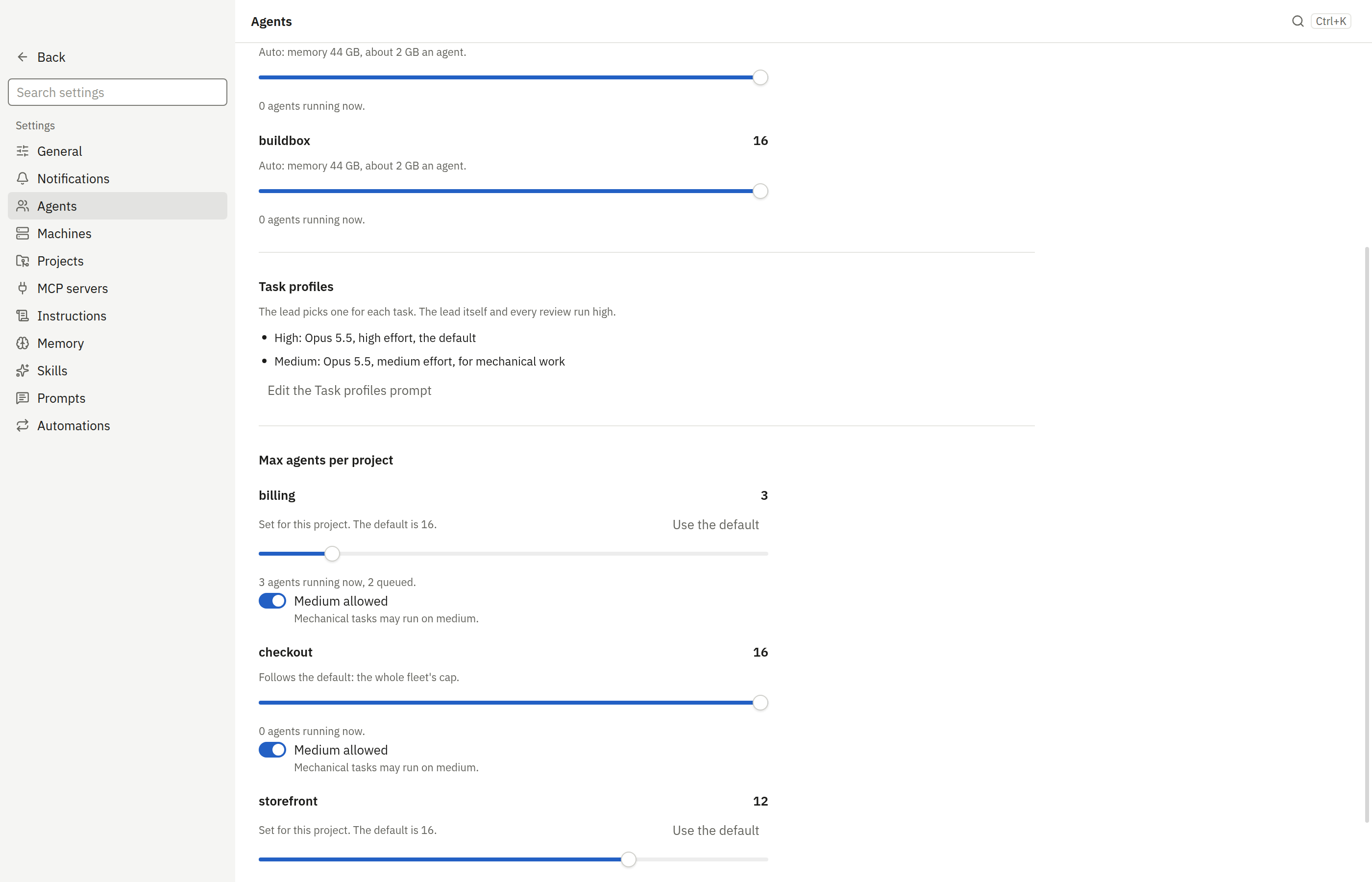
| Per project: Max agents | The project’s agents: writers, readers, reviewers. Not the lead. | Its machine’s cap, within the fleet cap: it follows a change to either at once | Click “max 12” beside the working count in the panel’s Agents tab, or use Settings → Projects → Agents, up to the fleet cap. Once set it is the project’s own, which no fleet or machine change moves; “Use the default” goes back. Past its machine’s cap, the slider says the machine holds it there until an admin raises the machine. |
| Fleet-wide | Every project’s agents together. Not the leads. | None: the machines’ caps added up | Settings › Hub › Machines → Max agents. Owners and admins only. A fleet cap saved before stays until you change it. |
New agents on a machine also wait for disk: 5 GB each (diskPerAgentGb) above the free-space floor, with agents started
in the last 10 minutes still counted, since their worktrees haven’t grown yet. The lead’s state line names what sets
its cap, e.g. “agents: 4 running of 6 (auto: memory 18 GB, about 2 GB an agent), 2 queued, 0 free”, or “fleet cap
set”, “machine cap set” and “max agents set”. When slots have sat free for 10 minutes, with no agent starting or ending,
while approved work is open, the state says so in one line, and the lead splits that work into parts whose files don’t
overlap and runs them at once.
The memory figure only sizes a machine’s auto cap. No agent waits for the memory it might take: a Max agents you set starts that many, as far as the machine’s cap and disk allow, and a machine you set runs that many whatever it is estimated to fit. What does hold new agents back is memory really in use, the guard’s pause at 90%.
The Agents tab shows “2 queued” when agents wait their turn. While you move the slider it says what the change will do; it applies when you let go, with Undo. A fleet cap below a project’s own max gets a warning.
Writers in a project run side by side, each in its own worktree and branch. The lead gives them slices that touch separate files; if two PRs still conflict, the merge train sends the later one back to its writer.
From a terminal:
fleetd project set devbox/storefront --max-agents 3fleetd project set devbox/storefront --max-agents 2 --pause-extrasfleetd project set devbox/storefront --max-agents defaultfleetd project set --fleet-cap 20 # needs an admin keyfleetd machine set devbox --max-agents 40 # needs an admin keyfleetd machine set devbox --max-agents autoFrom an MCP client: cap_set {project: {projectRef, maxAgents, pauseExtras?}} with an operate
key (followDefault: true in place of maxAgents goes back to the default), or cap_set {cap} for the fleet cap with an admin key, or cap_set {machine: {machineId, maxAgents}} for a machine with an
admin key (auto: true in place of maxAgents goes back to what it fits).
When the cap is reached:
- A new agent queues; it doesn’t fail. The lead is told its place in line, and the hub starts it the moment a slot frees.
- New agents also wait while their machine is short of disk or CPU (Disk and load).
- Reviewers count toward the cap, but a review that gates a merge goes first, so a low cap never stalls the merge train.
Changing it while work runs:
| You | What happens | The line in the chat |
|---|---|---|
| Lower the cap | Running agents finish their current work; new ones wait. Nothing is killed. | Max agents 6 → 3: 6 running finish their work; new agents wait. |
| Lower it, then click “Pause the 3 extras now” (“Pause the extra one now” for one) | Agents over the cap push their work in progress and wait. Each resumes when a slot frees. | Two lines: Max agents 6 → 3: 6 running finish their work; new agents wait. Then: Max agents 3: 3 agents push their work and wait; 3 keep running. |
| Raise the cap | Queued agents start at once, and the lead is told how many slots are free. | Max agents 3 → 6: 2 queued agents start now, 1 slot free. |
The lead plans to the cap: at most that many slices at once, the rest queued by value, each slot filled as it frees. It never works around the cap: it doesn’t do a writer’s work itself, or ask you to raise it unless you asked about speed. At a cap of 1 it works one piece at a time and says so once.
Models and cost
Section titled “Models and cost”Every agent runs on a task profile: a name, a one-line note on what it is for, a model, an effort and fast mode. The hub keeps any number of them, and one is the default. A new hub has two:
| Profile | Runs | For |
|---|---|---|
high (default) |
claude-opus-5-5 at effort high |
The lead, every review, claude’s helper calls (session titles and the like), and every task the lead names no other profile for. |
medium |
claude-opus-5-5 at effort medium |
Mechanical tasks only: dead-code deletions, renames, test removals, doc fixes, moving files, plain wiring, screenshot recaptures, cleanup. Never design, architecture or anything subtle. |
A project allows the default and the profiles it picks; nothing else. Its lead is told each allowed profile’s name and
note, and names one in spawn_agent when the note fits the work; spawn_agent refuses a profile the project doesn’t
allow and says which it does. A task on another profile whose review finds blockers twice is redone on the default.
Each agent’s profile shows on its lane (T12 medium), and the time view splits agent time and output tokens by
profile.
| To change | Do |
|---|---|
| Which profiles a project allows | Settings → Projects → Agents → Allowed profiles: a checkbox each, the default checked for good. Or fleetd project set <machine>/<project> --profiles medium,quick (none: the default alone). |
| A profile’s model, effort, fast mode or note, or which is the default | Settings → Hub → Every project → Profiles (owners and admins): New profile, Edit and Delete. Or fleetd project profile <name> --model claude-sonnet-5-5 --effort xhigh: a name that doesn’t exist yet makes a new profile; --delete removes one. |
| How the lead picks | Edit the Task profiles prompt (lead.profiles) like any prompt, or a profile’s note. It takes effect at the lead’s next start. |
What a profile runs on
Section titled “What a profile runs on”A profile’s model is one of the models the hub’s Claude configuration offers: what the Models API lists on the hub’s
API key when it has one (Settings › Hub accounts), else fleetd’s own list of current Claude models. Its effort is
one Claude Code takes: low, medium, high, xhigh or max; a model without that level runs the nearest one below. Fast
mode is Claude Code’s ("fastMode": true in the session’s settings), only on the models that have it (Opus 5.5, Opus
5 and Opus 4.8), at a higher price per token.
fleetd project profiles [<machine>/<project>] lists them, and with a project which it allows:
high claude-opus-5-5 at high (default, allowed) The default: design, architecture and anything subtle. When in doubt, this one.medium claude-opus-5-5 at medium (allowed) Only for mechanical work: dead-code deletions, renames, test removals, doc fixes, moving files, ...quick claude-opus-5-5 at low (fast, not allowed)From an MCP client, profiles_list, profile_create, profile_update, profile_delete and project_set do the
same. The default can’t be deleted, only replaced; nor can a profile a task not yet ended runs on. A renamed profile
keeps its tasks: the ones not yet ended move to the new name, ended ones show the name they ran on.
A change applies to agents started after it. Agents already running keep the model and effort they started on, and
each agent’s usage, time and lane report the model it really ran on. A node older than the hub runs effort xhigh as high, and
no profile in fast mode: update fleetd there.
If claude refuses a model (one your account or gateway has no access to), no agent is stranded: the agent goes on at
once on claude-opus-5-5, in the same run, and its thread says why. The hub then flags the profile:
fleetd project profiles shows which machine refused it and when, and new agents on it run on claude-opus-5-5 until
you set its model again.
The policy file has no say in any of this: an older .fleetd/policy.yaml’s defaults.model and defaults.effort
are ignored.
How the lead schedules work
Section titled “How the lead schedules work”The lead plans each piece of work as small items, sized S, M or L, some waiting after others. It starts every item it can
in parallel. Spawns past the cap queue and start by themselves as slots free, and the lead is woken whenever an agent
finishes or a PR merges. fleetd never starts work of its own.
Slices are reviewed as they land: once a writer’s PR is ready (not a draft), on its branch or one named after it, fleetd puts it on the train and starts its reviewers, while the writer goes on. On a repo whose PRs have never been on the train, that starts with the writer’s result. A new commit is reviewed again from what changed.
No gate relaxes. Every PR still gets its review and green CI and goes through the train, and anything that needs your approval still waits for it. The reviewers fleetd starts count against the slots and the lead’s limit of 32 open tasks like any task.